
mailFactory® Print@Exit allows you to create personalized envelopes on the inserting system. This is an important part in the white paper strategy to optimize your production process and expand your business opportunities.
The Kern White Paper Solution is an optimization in the production workflow. It supports the reduction of the required variety of preprinted paper and envelopes to a minimum. The production job is printed in full-color on white paper and inserted using white envelopes. Each envelope is printed in line at the exit of the inserting system and can be fully personalized. To optimize the print quality, the system has a thickness compensation table to adjust the distance to the print head depending on the envelope thickness. The printing system receives all envelope specific information from the Kern inserter in order to print each envelope individually. A 100% personalized printing with individual text and graphics is supported at full system speed. The customer base can be expanded significantly with this solution. Smaller production jobs can be merged and re-sorted, based on business and production rules to optimize the handling and minimize costs, for example postages.
Print@Exit from mailFactory® Solutions and the change to white envelopes are the key elements to implement a full White Paper Solution.
Main features
Stock reduction
Only white envelopes need to be stored. Customer logos, recipient addresses and marketing messages are printed in-line. Stock value and capital is being reduced.
Simplify envelope logistic
The stock logistic activities are reduced by cutting down the variety of envelopes and the distribution activities between storage and inserting. There is no change needed between production jobs, increasing productivity.
Easy marketing campaign
Marketing messages and graphics to be printed on the envelopes can easily be changed from one production run to the other. This allows dedicated marketing campaigns and opens new customer segments.
Simplify envelope handling
Minimize the price per envelope and the operating expenses.
Product Sheet mailFactory Print@Exit
5 MB

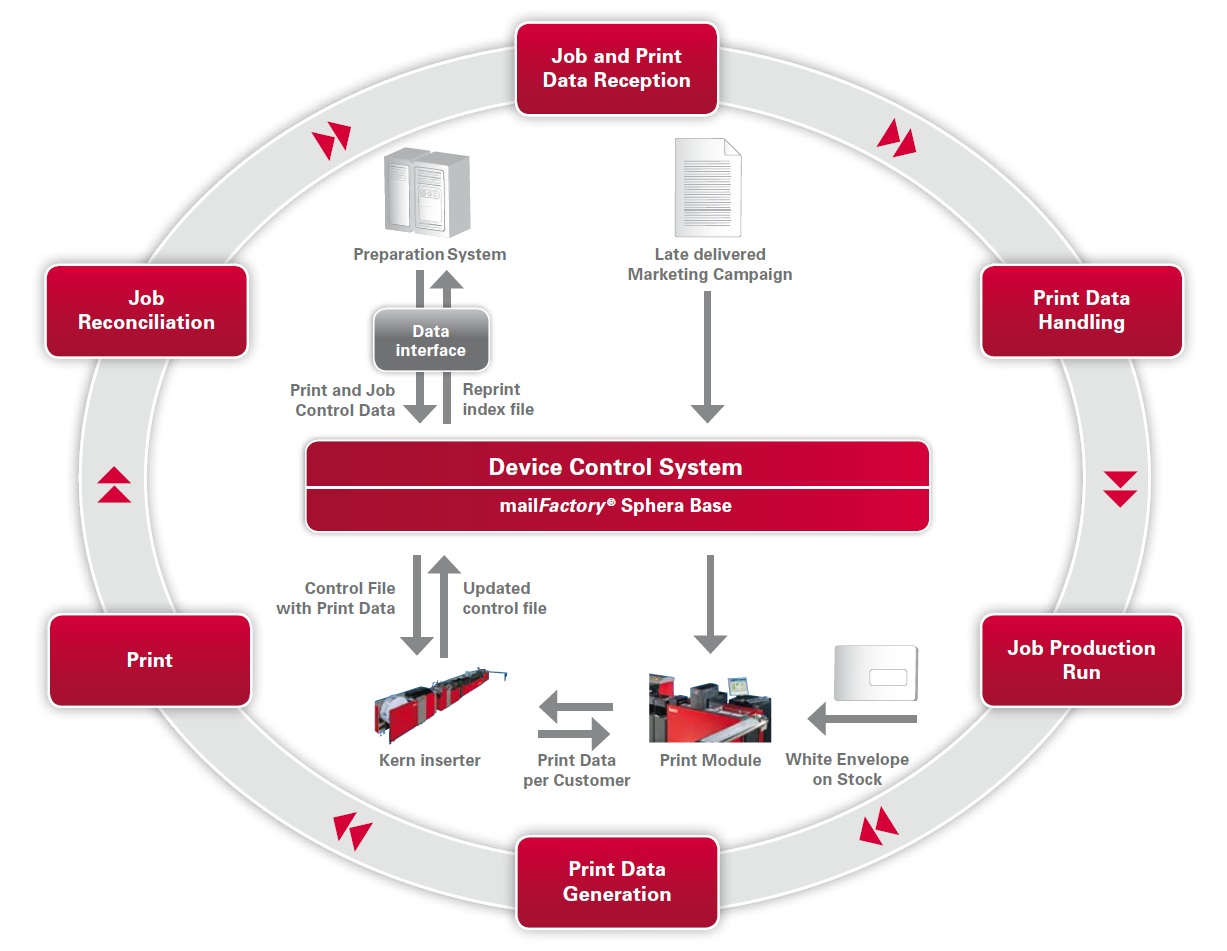
Workflow Print@Exit
Implementing a Kern printing module at the exit of a Kern inserting system is not just mounting a mechanical printing module but equates the integration of hardware and software components into an end-to-end designed and automatized production process.
The workflow shown above is explained as follows: Individual print data is created in a predefined format in the control file and imported by mailFactory® Document Control Service.
The imported data serves to supervise and produce the printing job. Every mailpiece is tracked throughout the inserting system and the corresponding print data is sent to the printer controller, as soon as a mailpiece arrives at the printing section where the print data is converted and rendered. The thickness compensation is calculated and the compensation table is positioned in the optimal distance to the print head (+/- 0,5 mm between envelope and print head) to achieve best print results. The printer controller verifies the data shortly after printing and mailFactory® Print@Exit diverts GOOD and BAD printed mail pieces in either the main bin or the printer control divert bin. Final results are reported to the mailpiece control system where the reprint management system updates the control file.
The mailFactory® Print@Exit solution includes a layout tool which is fully scalable and compatible with other mailFactory® products and is more than just a product. It’s added value for every integrated production center.
- We help to analyze the mail production process and offer consulting services to integrate mailFactory® Print@Exit optimally in your mailroom environment
- Project management services over the entire integration period
- Customizable software interfaces, components and solutions
- On-site trainings for your employees